
This article provides reference information for the Salesforce integration with Ordway. It covers how Salesforce and Ordway objects map to each other, how to configure field mappings, how to set up parent-child accounts, and how to manage permission sets and the connected user account.
Contents
- Salesforce to Ordway Object Mappings
- Default Object Field Mappings in Ordway
- Default Object Field Mappings in Salesforce
- Parent-Child Accounts in Salesforce and Ordway
- Add Custom Fields in Salesforce
- Configure Field Columns for Display in the Plan Picker
- Permission Sets
- Advanced Security Permissions
- Scheduler to Remove Old Application Logs
- Change Connected User Account for Salesforce to Ordway Connection
Salesforce to Ordway Object Mappings
Each type of record in Ordway has a matching object in Salesforce. Use this section to see which Salesforce objects correspond to which Ordway objects, and how data moves between them. The field-level details for each pair are in Default Object Field Mappings in Ordway and Default Object Field Mappings in Salesforce.
Salesforce objects fall into two groups:
- Native objects are standard Salesforce objects, such as Account and Opportunity.
- Custom objects are Salesforce objects whose names begin with “Ordway,” such as Ordway Contract and Ordway Quote.
Object Correspondence
How the Objects Connect
The flowchart shows how Salesforce objects relate to each other and to Ordway objects. Custom Salesforce objects appear in blue.
Default Object Field Mappings in Ordway
Mapping Salesforce to Ordway
Customer: Salesforce Account → Ordway Customer
| Ordway - Customer | Salesforce - Account |
| Id | Ordway Customer Id* |
| Name | Account Name |
| salesforce_id | Account ID |
Contact: Salesforce Contact → Ordway Contact
| Ordway - Contact | Salesforce - Contact |
| Id | Contact ID |
| Customer Id | Account ID |
| First Name | First Name |
| Last Name | Last Name |
| Phone | Phone |
| Notes | Follow-Up Notes |
| Address1 | Mailing Street |
| City | Mailing City |
| State | Mailing State/Province |
| Zip Code | Mailing Zip/Postal Code |
| Country | Mailing Country |
| salesforce_id | Contact ID |
| Sync From Salesforce | Sync From Salesforce |
Plans: Salesforce Ordway Plan → Ordway Plan
| Ordway - Plan | Salesforce - Ordway Plan |
| Id | Plan ID |
| Name | Plan Name |
| Description | Description |
| Status | Active |
| salesforce_id | Record ID |
Charges: Salesforce Ordway Charge → Ordway Charges
| Ordway - Charges | Salesforce - Ordway Charge |
| Id | Charge ID |
| Name | Charge Name |
| Plan Id | OrdwayLabs__OrdwayPlan__r (Relationship) |
| External ID | |
| Product Id | Ordway Product ID |
| Description | Description |
| Type | Charge Type |
| Timing | Charge Timing |
| Type | Charge Type |
| Billing Period | Billing Period |
| Effective Date | Billing Date |
| Pricing Model | Pricing Model |
| List Price | List Price |
| Billing Period Start Alignment | Billing Period Start Alignment |
| Billing Period - Specific Day of Month | Billing Period - Specific Day of Month |
| Billing Day | Billing Day |
| Billing Day - Specific Day of Month | Billing Day - Specific Day of Month |
| Back Charge Current Period | Back Charge Current Period |
| Included Units | Included Units |
| List Price Base | List Price Base |
| Prorate Partial Periods | Prorate Partial Periods |
| Unit of Measure | Unit of Measure |
| Proration Rules | Proration Rules |
| salesforce_charge_id | Record ID |
| salesforce_id | Product |
Charge Tier: Salesforce Ordway Charge Tier → Ordway Charge Tier
| Ordway - Charge Tier | Salesforce - Ordway Charge Tier |
| Tier | Tier |
| Starting Unit | Starting Unit |
| Ending Unit | Ending Unit |
| Price | List Price |
| Type | Pricing Type |
Product: Salesforce Ordway Product → Ordway Product
| Ordway - Product | Salesforce - Ordway Product |
| Id | Ordway Product ID |
| Name | Ordway Product Name |
| Taxable | Taxable |
| Status | Active |
| Description | Description |
| SKU | SKU |
| salesforce_id | Product |
Subscriptions: Salesforce Ordway Contract → Ordway Subscription
| Ordway - Subscriptions | Salesforce - Ordway Contract |
| Id | Ordway Subscription ID |
| Customer Id | OrdwayLabs__Account__r (Relationship) |
| Account ID | |
| Billing Contact Id | OrdwayLabs__BillingContact__r (Relationship) |
| Contact ID | |
| Shipping Contact Id | OrdwayLabs__ShippingContact__r (Relationship) |
| Contact ID | |
| Status | Ordway Contract Status |
| Billing Start Date | Billing Start Date |
| Service Start Date | Service Start Date |
| Contract Effective Date | Contract Effective Date |
| Cancellation Date | Cancellation Date |
| Auto-Renew | Auto Renew |
| Renewal Increment Percent | Renewal Increment Percent |
| Separate invoice | Generate Separate Invoice |
| Notes | Notes |
| Payment Terms | Payment Terms |
| Contract Term | Contract Term |
| Renewal Term | Renewal Term |
| Defer Start Date | Defer Start Date |
| MRR | Ordway MRR |
| Current Term End Date | Current Term End Date |
| Current Term Start Date | Current Term Strart Date |
| Bill To Parent Customer ID | Billable Parent Customer |
| salesforce_id | Record ID |
Subscription Charges: Salesforce Ordway Contract Line Item → Ordway Subscription Charges
| Ordway - Subscription Charges | Salesforce - Ordway Contract Line Item |
| Subscription ID | OrdwayLabs__OrdwayContract__r(Relationship) |
| Record ID | |
| Product ID | Ordway Product Id |
| Product Name | Ordway Product Id |
| Plan ID | Ordway Plan Id |
| Plan Name | Name |
| Charge ID | Ordway Charge Id |
| Charge Name | Charge Name |
| Pricing Model | Pricing Model |
| List Price | Ordway List Price |
| Quantity | Quantity |
| Discount | Discount |
| Effective Price | Ordway Effective Price |
| Billing Period | Billing Period |
| Charge Timing | In Advance |
| Billing Period Start Alignment | Billing Period Start Alignment |
| Billing Period - Specific Day of Month | Billing Period - Specific Day of Month |
| Billing Day | Billing Day |
| Billing Day - Specific Day of Month | Billing Day - Specific Day of Month |
| Charge Start Date | Charge Start Date |
| Charge End Date | Charge End Date |
| Charge Billing Date | Charge Billing Date |
| Tiers | Tier JSON |
| Backcharge Current Period | Change End Date |
| salesforce_id | Record ID |
Subscription Charge Tier: Salesforce Ordway Contract Line Item Tier → Ordway Subscription Charge Tier
| Ordway - Subscription Charge Tier | Salesforce - Ordway Contract Line Item Tier |
| Tier | Tier |
| Starting Unit | Starting Unit |
| Ending Unit | Ending Unit |
| Price | List Price |
| Type | Pricing Type |
Quote: Salesforce Ordway Quote → Ordway Quotes
| Ordway - Quotes | Salesforce - Ordway Quote |
| Id | Record ID |
| Customer Id | OrdwayLabs__Account__r (Relationship) |
| Account ID | |
| Status | Status |
| Billing Start Date | Billing Start Date |
| Service Start Date | Service Start Date |
| Quote Placed At | Quote Date |
| Quote Expiry At | Expiry Date |
| Contract Effective Date | Contract Effective Date |
| Auto-Renew | Auto Renew |
| Separate invoice | Generate Separate Invoice |
| Contract Term | Contract Term |
| Renewal Term | Renewal Term |
| Require Payment Method | Payment Required on Quote Acceptance |
| Sender Name | Sender Name |
| Sender Email | Sender Email |
| Recipient Name | Recipient Name |
| Recipient Email | Recipient Email |
| Template Id | Quote Template Id |
| Subscription Number | Ordway Subscription ID |
| Quote Type | Type |
| Template Id | Quote Template Id |
| salesforce_id | Record ID |
Quote Charges: Salesforce Ordway Quote Line Item → Ordway Quote Charges
| Ordway - QuoteCharges | Salesforce - Ordway Quote Line Item |
| Quote ID | OrdwayLabs__Quote__r (Relationship) |
| Record ID | |
| Product Id | Ordway Product Id |
| Product Name | Ordway Product Name |
| Plan Id | Ordway Plan Id |
| Charge Id | Ordway Charge Id |
| Charge Name | Ordway Charge Name |
| Pricing Model | Pricing Model |
| List Price | Ordway List Price |
| Quantity | Quantity |
| Discount | Discount |
| Effective Price | Ordway Effective Price |
| Charge Type | Charge Type |
| Billing Period | Billing Period |
| Billing Period Start Alignment | Billing Period Start Alignment |
| Billing Period - Specific Day of Month | Billing Period - Specific Day of Month |
| Billing Day - Specific Day of Month | Billing Day - Specific Day of Month |
| Billing Day | Billing Day |
| Unit of Measure | Unit of Measure |
| Charge End Date | Charge End Date |
| Charge Billing Date | Billing Date |
| Tiers | Tier JSON |
| salesforce_id | Record ID |
Quote Charge Tier: Salesforce Ordway Quote Line Item Tier → Ordway Quote Charge Tier
| Ordway - Quote Charge Tier | Salesforce - Ordway Quote Line Item Tier |
Tier |
Tier |
| Starting Unit | Starting Unit |
| Ending Unit | Ending Unit |
| Price | List Price |
| Type | Pricing Type |
Usage: Salesforce Ordway Usage → Ordway Usage
| Ordway - Usage | Salesforce - Ordway Usage |
| Id | Usage Id |
| Quantity | Quantity |
| Date | Date |
| salesforce_id | Record ID |
Mapping Ordway to Salesforce -- Ordway Contract
Customer: Ordway Customer → Salesforce Account
| Ordway - Customer | Salesforce - Account |
| salesforce_id | Account ID |
| Name | Account Name |
| Parent Customer Id | Parent Account ID |
| Website | Website |
| Id | Ordway Customer Id* |
Contact: Ordway Contact → Salesforce Contact
| Ordway - Contact | Salesforce - Contact |
| salesforce_id | Contact ID |
| Id | External ID |
Ordway Contract and Contract Line Item: Ordway Subscription → Salesforce Ordway Contract
| Ordway - Subscription | Salesforce - Ordway Contract |
| salesforce_id | Record ID |
| Auto-Renew | Auto Renew |
| Billing Start Date | Billing Start Date |
| Contract Effective Date | Contract Effective Date |
| Contract Term | Contract Term |
| Current Term End Date | Current Term End Date |
| Current Term Start Date | Current Term Start Date |
| Customer Id | Customer Id |
| Defer Start Date | Defer Start Date |
| Id | External ID |
| Status | Ordway Contract Status |
| MRR | Ordway MRR |
| Renewal Term | Renewal Term |
| Service Start Date | Service Start Date |
| TCV | Total Contract Value |
Ordway Subscription Charge → Salesforce Ordway Contract Line Item
| Ordway - SubscriptionCharge | Salesforce - Ordway Contract Line Item |
| Line Id | External ID |
| Product Name | Product Name |
| Billing Period | Billing Period |
| Discount | Discount |
| Quantity | Quantity |
| Charge Id | Ordway Charge Id |
| Charge Type | Charge Type |
| List Price | Ordway List Price |
| Effective Price | Ordway Effective Price |
| Plan Id | Ordway Plan Id |
| Product Id | Ordway Product Id |
| Pricing Model | Pricing Model |
| Tiers | Tier JSON |
| Unit of Measure | Unit of Measure |
| Included Units | Included Units |
| salesforce_id | Record ID |
Product: Ordway Product → Salesforce Ordway Product
| Ordway - Product | Salesforce - Ordway Product |
| Name | Ordway Product Name |
| Status | Active |
| Description | Description |
| Id | External Id |
| salesforce_id | Product |
| SKU | SKU |
| Taxable | Taxable |
Plans and Charges: Ordway Plan → Salesforce Ordway Plan
| Ordway - Plan | Salesforce - Ordway Plan |
| Id | External Id |
| Name | Plan Name |
| Status | Active |
| salesforce_id | Record ID |
Ordway Charge → Salesforce Ordway Charge
| Ordway - Charge | Salesforce - Ordway Charge |
| salesforce_charge_id | Record ID |
| Name | Charge Name |
| Plan Id | Ordway Plan |
| Effective Date | Billing Date |
| Billing Period | Billing Period |
| Timing | Charge Timing |
| Type | Charge Type |
| Id | External ID |
| List Price | List Price |
| Pricing Model | Pricing Model |
| Product Id | Ordway Product ID |
| salesforce_id | Product |
| Unit of Measure | Unit of Measure |
Invoice and Invoice Line: Ordway Invoice → Salesforce Invoice
| Ordway - Invoice | Salesforce - Invoice |
| Customer Id | Customer ID |
| Customer Name | Customer Name |
| ID | Invoice ID |
| Invoice Date | Invoice Date |
| Due Date | Due Date |
| Invoice Amount | Invoice Amount |
| Balance | Balance |
| Start Date | Start Date |
| End Date | End Date |
| Notes | Notes |
| Status | Status |
| Paid Amount | Paid Amount |
| SubTotal | Sub Total |
| Invoice Tax | Invoice Tax |
| Payment Terms | Payment Terms |
Ordway Invoice Line → Salesforce Invoice Line Item
| Ordway - Invoice Line | Salesforce - Invoice Line Item |
| Product Name | Product Name |
| Line No | Invoice ID & Line ID |
| Subscription Id | Subscription ID |
| Plan Name | Plan Name |
| Charge Name | Charge Name |
| Quantity | Quantity |
| Effective Price | Effective Price |
| Product Id | Product ID |
| Plan Id | Plan ID |
| Charge Id | Charge ID |
| Charge Type | Charge Type |
| Start Date | Start Date |
| End Date | End Date |
| Unit Price | Unit Price |
| Discount | Discount |
| Order ID | Order ID |
| Description | Description |
| Taxable | Taxable |
| Line Tax | Line Tax |
Payment: Ordway Payment → Salesforce Payment
| Ordway - Payment | Salesforce - Payment |
| Customer ID | Customer ID |
| ID | Payment ID |
| Payment Date | Payment Date |
| Payment Amount | Payment Amount |
| Status | Status |
| Payment Type | Payment Type |
| Fee Amount | Fee Amount |
| Applied Amount | Applied Amount |
| Un-Applied Amount | Un-Applied Amount |
| Refunded Amount | Refunded Amount |
| Payment Method | Payment Method |
| Auto Apply | Auto Apply |
| Reference Number | Reference Number |
| Notes | Notes |
| GL Account | GL Account |
Refund: Ordway Refund → Salesforce Refund
| Ordway - Refund | Salesforce - Refund |
| Customer Id | Customer ID |
| ID | Refund ID |
| Payment Id | Payment ID |
| Refund Date | Refund Date |
| Refund Amount | Refund Amount |
| Invoice Id | Invoice ID |
| Refund Type | Refund Type |
| Refund Status | Refund Status |
| Credit Id | Credit ID |
| Notes | Notes |
| Reference Number | Reference Number |
Credit: Ordway Credit → Salesforce Credit
| Ordway - Credit | Salesforce - Credit |
| ID | Credit ID |
| Credit Date | Credit Date |
| Credit Amount | Credit Amount |
| Customer Id | Customer ID |
| Status | Status |
| Applied Amount | Applied Amount |
| Un-Applied Amount | Un-Applied Amount |
| Auto Apply | Auto Apply |
| Reference Number | Reference Number |
| GL Account | GL Account |
Quote and Quote Charge: Ordway Quote → Salesforce Ordway Quote
| Ordway - Quote | Salesforce - Ordway Quote |
| salesforce_id | Record ID |
| Auto-Renew | Auto Renew |
| Billing Start Date | Billing Start Date |
| Contract Effective Date | Contract Effective Date |
| Contract Term | Contract Term |
| Quote Expiry At | Expiry Date |
| Id | External ID |
| Subscription Number | Ordway Subscription ID |
| Require Payment Method | Payment Required on Quote Acceptance |
| Quote Pdf Url | Preview URL |
| Quote Placed At | Quote Date |
| Template Id | Quote Template Id |
| Recipient Email | Recipient Email |
| Recipient Name | Recipient Name |
| Renewal Term | Renewal Term |
| Sender Email | Sender Email |
| Sender Name | Sender Name |
| Service Start Date | Service Start Date |
| Status | Status |
Ordway Quote Charge → Salesforce Quote Line Item
| Ordway - Quote Charge | Salesforce - Quote Line Item |
| salesforce_id | Record ID |
| Billing Period | Billing Period |
| Charge Name | Ordway Charge Name |
| Charge Type | Charge Type |
| Discount | Discount |
| Included Units | Included Units |
| Charge Id | Ordway Charge Id |
| Effective Price | Effective Price |
| List Price | Ordway List Price |
| Plan Id | Ordway Plan Id |
| Product Id | Ordway Product Id |
| Pricing Model | Pricing Model |
| Product Name | Product Name |
| Quantity | Quantity |
| Tiers | Tier JSON |
| Unit of Measure | Unit of Measure |
Usage: Ordway Usage → Salesforce Usage
| Ordway - Usage | Salesforce - Usage |
| salesforce_id | Record ID |
| Charge Id | Charge ID |
| Date | Date |
| Description | Description |
| Id | External ID |
| Invoiced | Invoiced |
| Customer Id | Ordway Customer ID |
| Quantity | Quantity |
| Subscription Line Id | Subscription Charge Line ID |
| Subscription Id | Subscription ID |
| Unit of Measure | Units of Measure |
Default Object Field Mappings in Salesforce
Opportunity to Ordway Contract
OpportunityLineItem to Ordway Contract Line Item
Opportunity Product to Ordway Contact Line Item
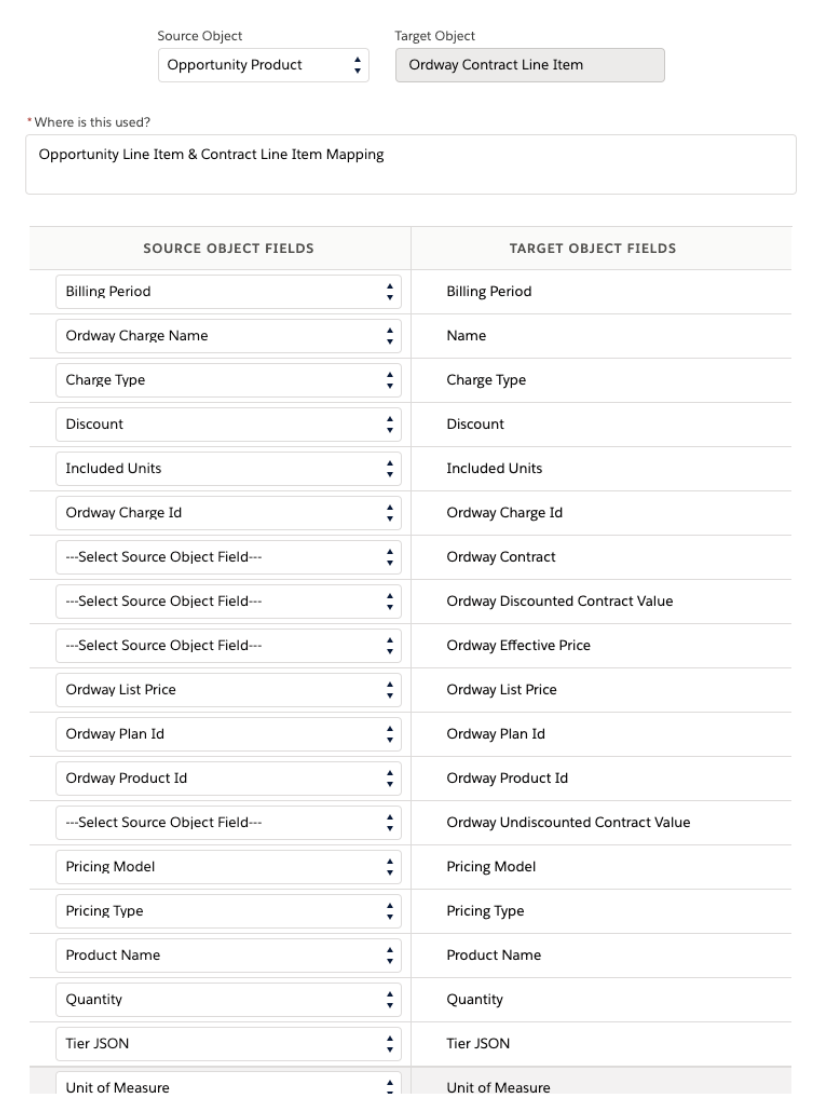
Ordway Contract Line Item to Opportunity Product
Parent-Child Accounts in Salesforce and Ordway
For the Parent Account in Salesforce to be created as a Parent Customer account in Ordway, the following Salesforce to Ordway mapping should be established:
Customer
Salesforce Account → Ordway Customer
| Ordway - Customer | Salesforce - Account |
| Parent Customer ID | Parent Account ID |
Upon syncing an Ordway Contract that belongs to a Child Account to Ordway, Ordway will create a Customer record for the Parent Account if it does not already exist.
If Parent Accounts should not automatically be created as Customer account in Ordway, make sure the above mapping is not present.
Add Custom Fields in Salesforce
To add a custom field at the Product and Contract Line-Item level:
- Go to Setup > Object Manager.
- Object Manager → Opportunity Product.
- Click on Fields & Relationships.
- Configure the field.
- Repeat the above steps for Object Manager → Ordway Contract Line Item.
- Go to Ordway Field Mappings.
- Select Ordway Opportunity Line Item as the Source Object and click Search.
- Find the custom field name in the list of Target Object Fields. Select the custom field name in the drop down under Source Object Field.
- Click Update.
To display a custom field in the Plan Picker:
- Go to Setup > Object Manager.
- Object Manager → Opportunity Product.
- Click on Fields & Relationships.
- Create and configure the new field.
-
Add the field to the field set Plan Picker configured in Opportunity product object:
- Reorder the fields in the field set to reorder the dynamic columns, as desired.
- Follow steps in the above section to map Opportunity Product field to Contract Line Item.
Configure Field Columns for Display in Plan Picker
Version 4.6.2 or earlier:
You can hide or display field columns other than Plan ID and Plan Name in the Plan Picker.
- Go to Setup > Object Manager > Opportunity Product.
- On the Opportunity Product page, go to Fields Sets > Plan Picker Read Only Fields.
- Drag fields into the Field Set to display them. Remove fields from the Field Set to hide them.
Permission Sets
| Permission Set Name | Permissions |
| Ordway CPQ - Admin |
Has view all/modify all on all Ordway objects except entity objects and settings. Has access to the Ordway Settings tab to configure the connection and other settings. Can delete Opportunities that are associated with an Ordway Contract. Note: Assign this permission set to the user account that is used to connect Salesforce from Ordway. |
| Ordway CPQ - User | Does not have view all/modify all on Ordway objects. Does not have access to the Ordway Settings tab. |
| Ordway CPQ - Multi-Entity |
Does not have view all/modify all on Ordway objects. Does not have access to the Ordway Settings tab. Has access only to the entity object and entity-related fields on all objects. Note: If Multi-Entity is enabled, assign this permission set to all users who have the CPQ Admin or CPQ User permission set. |
Granular Permission Controls
When you select either of the permissions below, the advanced security permissions in the next section are granted. You can grant these permissions to specific users.
| Permission | Description |
|---|---|
| Ordway CPQ - Allow Deletion of Opportunities | Ability to delete Opportunities that are associated with an Ordway Contract. This permission is included in the Ordway CPQ Admin permission set. |
| Ordway CPQ Component Button Control | Contains the permissions to perform button actions across all objects in the package. |
Advanced Security Permissions
When Ordway CPQ Component Button Control is used as a permission set, the following advanced permissions are granted.
| Permission | Object(s) Where Used | Description |
| Ordway - Manage Plans | Opportunities & Quotes | Manage Plans within Salesforce. Note: Plans should be edited and managed within Ordway. |
| Ordway - Sync to Ordway | Opportunities, Quotes, Contracts, and Account | Sync Salesforce content to Ordway. |
| Ordway - View In Ordway | Opportunities, Quotes, Contracts, and Account | View Salesforce Objects in Ordway. |
| Ordway Contract - Activate Contract | Contracts | Activate an Ordway Contract in Salesforce. |
| Ordway Contract - Cancel Contract | Contracts | Cancel an Ordway Contract in Salesforce. |
| Ordway Contract - Create Change/Renewal Opportunity | Opportunities | Create a Change/Renewal Opportunity in Salesforce. |
| Ordway Contract - Sync to Update from Ordway | Opportunities, Quotes, Contracts, and Account | Ability to sync updates from Ordway to Salesforce. |
| Ordway Opportunity - Create Ordway Contract | Opportunities, Quotes, Contracts, and Account | Create an Ordway Contract in Salesforce. |
| Ordway Opportunity - Create Quote | Quotes | Create a Quote in Salesforce. |
| Ordway Opportunity - Update Ordway Contract | Contracts | Update an Ordway Contract in Salesforce. |
| Ordway Quote - Activate & Send | Quotes | Activate and Send a Quote in Salesforce. |
| Ordway Quote - Cancel | Quotes | Cancel an Ordway Quote in Salesforce. |
| Ordway Quote - Convert | Quotes | Convert an Ordway Quote in Salesforce. |
| Ordway Quote - Select Template & Preview | Quotes | Select Template and Preview an Ordway Quote in Salesforce. |
| Ordway Quote - Sync to & Update from Ordway | Quotes | Sync to and update an Ordway Quote to Salesforce. |
Configure Custom Button Control Permissions per User or Role
1. Clone the Ordway CPQ Component Button Control permission set.
2. Remove any permissions from the new permission set that the user or role should not have.
3. Assign the permission set to the appropriate user.
Note: The user must also have either the Ordway CPQ - Admin or the Ordway CPQ - User permission set assigned.
Scheduler to Remove Old Application Logs
Available in version 4.6.2, you can set an Apex scheduler (DeleteApplicationLog_Scheduler) to clear non-error application logs that are older than 90 days.
Configure the scheduler in your Salesforce instance by going to Setup > Platform Tools > Custom Code > Apex Classes > Schedule Apex.
Change Connected User Account for Salesforce to Ordway Connection
Best practice: Use a generic user email or account that is not associated with a specific person to connect Salesforce and Ordway.
- Navigate to Menu > Setup > Integrations > Salesforce > Settings.
-
Click Disconnect.
- Open Salesforce using the new credentials.
-
Go to Ordway Settings > Ordway Connection. The Ordway Connection screen displays:
- Enter email address, company name, and token. This information must exactly match the Ordway setup.
- To find the token value in Ordway, navigate to Menu > Setup > Users, then click the desired user. Copy the token from the User profile.
-
For live integrations, select Production as the Ordway environment to be connected.
- Reconnect in Ordway as outlined in Connect to Salesforce in Ordway.
Comments
0 comments
Please sign in to leave a comment.