
Contents
- Overview
- Onboarding Flow
- Enter Company Information
- Require Document
- Identify Key Decision Maker
- Identity Verification
- Add Payout Bank Account
- Provide PCI Compliance Information
- Important Notes
Overview
The Ordway Payments onboarding process enables businesses to securely set up payment processing capabilities within the Ordway platform.
This process includes:
- Business verification
- Identity validation
- Bank account setup
- Compliance requirements
Before You Begin
To generate the onboarding link, you must first provide preliminary business information to the Ordway team.
Preliminary Information Required
Provide the following details:
- Legal entity name of the company
- Country or region of registration
- Time zone
- Default settlement currency
- Phone number (of the business owner or financial decision-maker)
- Website or application URL
Onboarding Link Generation
Once the preliminary information is submitted:
- The Ordway team generates a secure onboarding link
- The link is shared with the customer to complete onboarding
Onboarding Workflow
The onboarding process consists of the following steps:
Provide Business Details
Select Business Type
Choose the structure that best represents your organization:
-
Sole Proprietorship
You are an individual owner using a personal or sole proprietorship bank account -
Company
Your business is a separate legal entity
(Example: LLC, Corporation, Inc.) -
Partnership or Association
Your business operates as a partnership
(Example: LLP, GP, LLLP)
Set Up Your Account
Once the business type is selected, users must complete the following sections:
-
Business Details
Enter general information about the business -
Decision-Makers
Add details of individuals responsible for financial decisions -
Bank Account Details
Provide payout bank account information -
Sign Services Agreement
Review and sign legal disclosures
Enter Basic Business Information
Users are required to provide:
- Country/Region of Establishment
- Business Legal Name
- Employer Identification Number (EIN)
- State of Registration
Enter Company Information
Provide detailed information about your organization, including:
Company Structure
Select the type of company:
-
Private Company
Owned privately and not publicly traded (e.g., LLC, Private Corporation) -
Public Company
Listed on a public stock exchange and required to disclose financials -
Non-profit or Charitable Organization
Registered as a non-profit or tax-exempt entity -
Governmental Organization
Owned or operated by a government body
Additional Business Details
Provide supporting business information:
-
DBA (Doing Business As)
Indicate if the business operates under a different name -
Registered Business Address
Enter official address details:- Street Address
- Apartment/Suite (optional)
- City, State, ZIP Code
-
Principal Place of Business
Specify the primary business location
(Option to mark same as registered address)
Required Document
You must upload a valid Business Identification Document for verification.
Accepted Documents
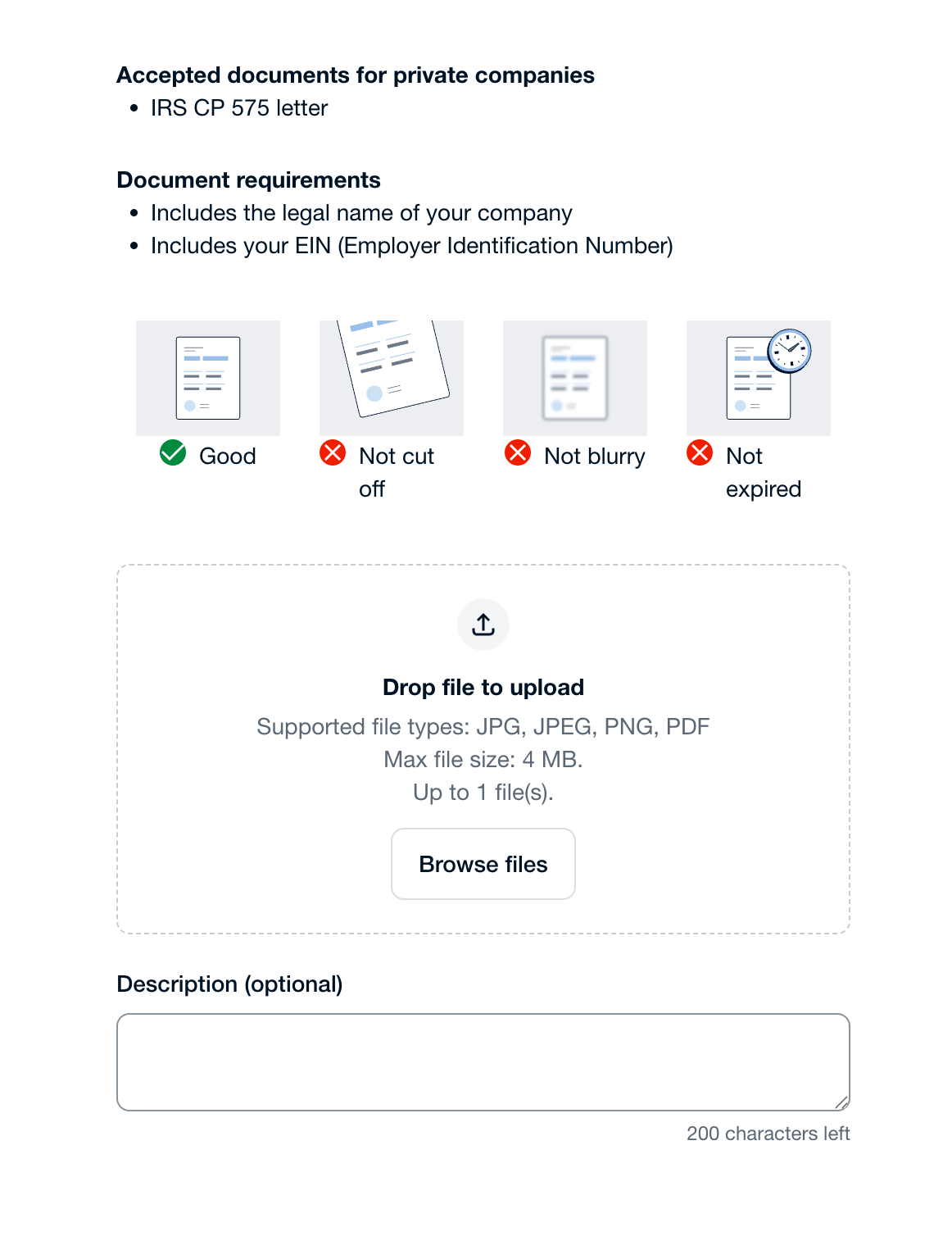
- IRS CP 575 Letter (for private companies)
- Certificate of Incorporation
- Business Registration Certificate
Document Requirements
Uploaded documents must:
- Include the legal name of the company
- Include the EIN (Employer Identification Number)
- Be clear and readable (not blurry)
- Be complete (not cut off)
- Be valid (not expired)
File Upload Guidelines
- Supported formats: JPG, JPEG, PNG, PDF
- Maximum file size: 4 MB
- Maximum files: 1 file
Notes
- Ensure the document matches the business details entered earlier
- Incorrect or unclear documents may delay verification
Identify Key Decision Maker
Provide details of individuals responsible for business ownership and financial decision-making. This information is required to comply with global financial regulations.
Identify Authorized Signatory
Specify whether the individual has authority to sign contracts and official documents on behalf of the business.
- Yes – Individual is an authorized signatory
- No – Individual does not have signing authority
Identify Beneficial Owner
Determine if the individual qualifies as a beneficial owner:
- A beneficial owner is someone who owns 25% or more of the business (directly or indirectly)
- Yes – Individual is a beneficial owner
- No – Individual is not a beneficial owner
Identify Control Responsibility
Check if the individual has significant responsibility to:
- Control
- Manage
- Direct business operations
- Yes – Individual has control/responsibility
- No – No significant control
Enter Individual Details
Provide the following information:
- First Name (as per ID document)
- Last Name (as per ID document)
- Job Title
- Email Address
- Phone Number
Identity Verification
Identity Verification Initiation
The system requires the key decision maker to complete identity verification.
User chooses:
- Start verification (via document scan)
- OR enter details manually
Select Document Type
User selects:
- Issuing country
- Type of identification document:
- Driver’s License
- National ID
- Passport
Upload / Capture Document
User provides the document by:
- Uploading an image
- OR capturing it using a mobile device
The document must be:
- Clear
- Valid
- Not expired
Provide Additional Personal Details
User enters required personal information:
- Residential Address
- City, State, ZIP Code
- Date of Birth
- Last 4 digits of SSN (if applicable)
Verification Processing
The system verifies the submitted:
- Identity document
- Personal details
Verification Completion
Once verification is successful:
- The individual is marked as Verified
- The decision maker is added to the business
Add Payout Bank Account
Provide the bank account details where payouts will be received.
Select Verification Method
User chooses how to verify the bank account:
-
Instant Verification (Recommended)
Log in via bank (faster verification) -
Manual Verification
Enter bank details manually (may require additional documents)
Enter Bank Account Details
User provides:
- Bank Account Country/Region
- Routing Number
- Account Number
The bank account must be in the company’s name
Upload Supporting Document (Optional)
To verify bank details, user may upload a document such as:
- Bank Statement
- Deposit Slip
- Screenshot of Online Banking
- Letter from Bank
- Check
Document should:
- Show business name
- Be recent (within last 12 month
Verification Processing
The system validates the bank account details and documents (if provided).
Completion
Once verification is successful:
- Bank account is added for payouts
- User can proceed with onboarding
Provide PCI Compliance Information
Enter required details to ensure compliance with PCI (Payment Card Industry) standards.
This step ensures secure handling of payment data.
Review Service Agreement
Review the service agreement before completing onboarding:
https://drive.google.com/file/d/12sn4vUuQ0gXu2_lR35waRBX0vJo2VJtn/view?usp=sharing
Completion and Approval
After submitting all required details:
- Your application is reviewed by the Ordway team
- Approval typically takes 24–48 hours
Outcome
Once approved:
- Your Ordway Payments account is activated
- A Balance Account is created
- You can start configuring payment methods and processing transactions
Important Notes
- Ensure all submitted documents are valid and up to date
- Incomplete or incorrect information may delay approval
- Use official business and banking details only
Comments
0 comments
Please sign in to leave a comment.